Cuando las personas piensan en GIS, la mayoría de las veces piensan en mapas, coordenadas, proyecciones y geometría de objetos. Pero detrás de los elementos visuales hay otro elemento importante: la topología. La topología es responsable de las conexiones lógicas entre objetos y hace que el análisis espacial sea preciso.
La topología en GIS es una forma de describir las relaciones espaciales entre objetos: cómo se conectan, se intersectan y se ubican entre sí. A diferencia de la geometría, que se encarga de la forma y las coordenadas, la topología describe la estructura de los datos. Por ejemplo, en una red vial, no solo es importante la posición de las líneas, sino también cómo están conectadas.
Relaciones topológicas básicas
La topología se basa en varios tipos básicos de relaciones entre objetos.
Adyacencia: define qué objetos limitan entre sí, como parcelas de terreno adyacentes.
Intersección: muestra si los objetos se intersectan. Esto es importante, por ejemplo, al analizar cruces entre carreteras y ríos.
Contención: un objeto está contenido dentro de otro, como puntos (edificios) dentro de un polígono (ciudad).
Conectividad: una relación clave para objetos lineales. Muestra si las líneas están conectadas en nodos, lo cual es especialmente importante para el análisis de redes.
Estas relaciones permiten operaciones espaciales complejas y el análisis de relaciones entre objetos.
Reglas topológicas y errores comunes
Para garantizar que los datos se mantengan precisos, GIS utiliza reglas topológicas. Estas establecen restricciones que las entidades deben cumplir.
Ejemplos de reglas:
– los polígonos no deben intersectarse
– los límites deben coincidir
– las líneas deben estar conectadas en nodos
Si se incumplen las reglas, se producen errores. Existen los siguientes tipos de errores topológicos incorrectos:
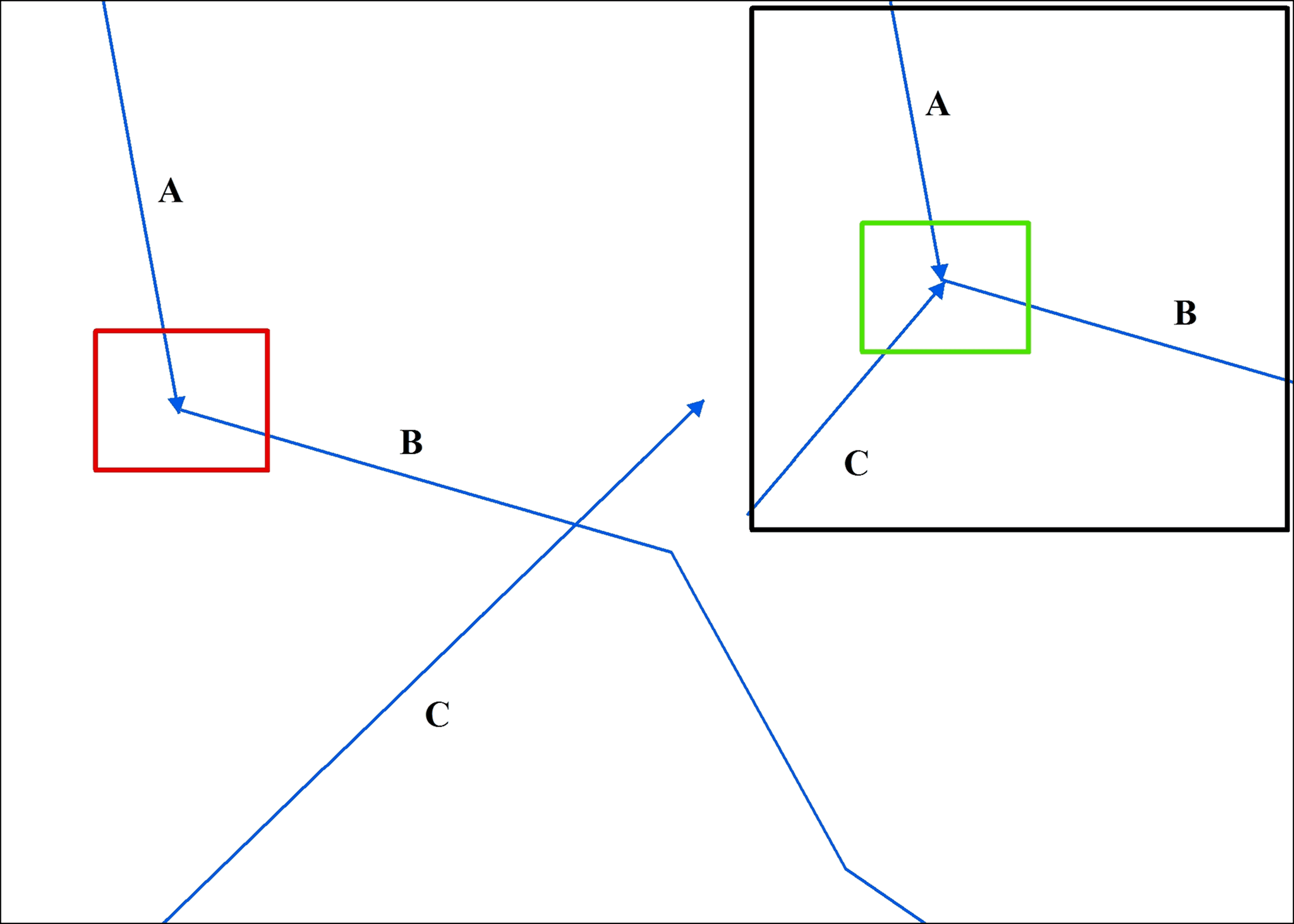
Un ejemplo de un error de topología que involucra líneas que se intersectan/superponen. La línea C se superpone a la línea B, lo cual es un error y debe recortarse en la unión de las líneas A y B (recuadro rojo). La solución correcta a este error se muestra en el recuadro verde en el recuadro insertado. Fuente: USGS.gov
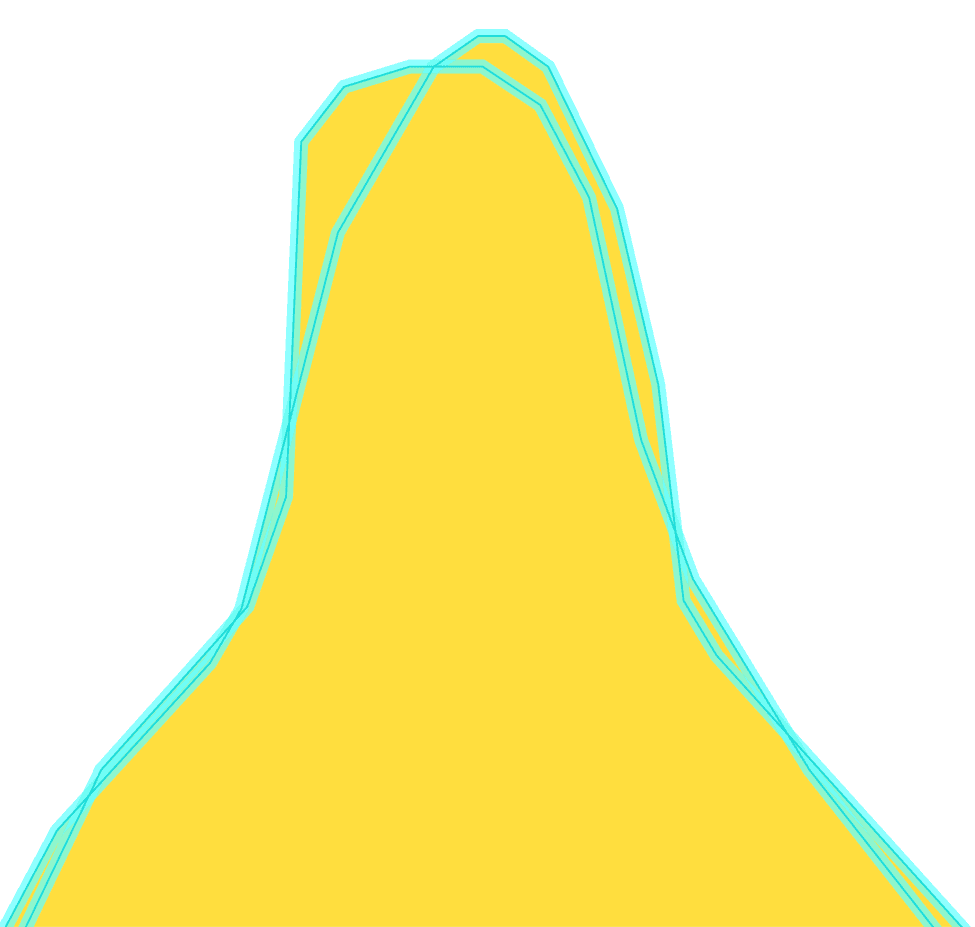
Un ejemplo de un límite de polígono que se auto-intersecta. Fuente: USGS.gov
Estos errores pueden conducir a resultados de análisis incorrectos, por ejemplo, al calcular áreas o trazar rutas.
Por lo tanto, GIS siempre verifica y corrige la topología antes del análisis de datos.
Pasos del flujo de trabajo de topología
Las plataformas GIS modernas proporcionan herramientas integradas para trabajar con topología.
En ArcGIS, puedes crear reglas topológicas y validar datos automáticamente. QGIS usa el complemento Topology Checker, que ayuda a encontrar errores. PostGIS implementa un modelo de datos topológico completo, lo que permite almacenar relaciones entre entidades a nivel de base de datos.
El flujo de trabajo sigue un patrón cíclico:
Creación de reglas: Define relaciones (p. ej., "puntos dentro de polígonos") en la configuración de la herramienta.
Validación de datos: Ejecuta la validación en todos los objetos o en los modificados para encontrar errores.
Corrección de errores: Edita la geometría manual o automáticamente (agrupamiento de vértices).
Revalidación: Verifica solo las áreas actualizadas para su confirmación.
Preguntas frecuentes
¿Por qué es importante la topología si la geometría ya es correcta?
Incluso si las geometrías se ven correctas visualmente, las conexiones faltantes o incorrectas entre entidades pueden provocar errores en el análisis, especialmente en redes y relaciones espaciales.
¿Cuándo debe verificarse la topología en un proyecto?
La topología debe validarse después de la creación o edición de datos, y antes de realizar análisis espacial para garantizar la consistencia de los datos.
¿Se pueden corregir automáticamente los errores de topología?
Algunos errores pueden corregirse automáticamente usando herramientas GIS, pero los problemas complejos suelen requerir edición manual.
Conclusiones clave
La topología define cómo se relacionan entre sí los objetos espaciales, más allá de su geometría y coordenadas. Las reglas topológicas ayudan a mantener la calidad de los datos al prevenir superposiciones, huecos y conexiones incorrectas. Una topología válida es esencial para un análisis espacial preciso, especialmente en tareas basadas en redes y límites.