Maps are, to a large extent, simplified models of a territory. When zooming out, it becomes impossible to show all roads, buildings, rivers, and other features on a map without losing legibility. This is why the concept of generalization—the process of selecting and simplifying data—exists in cartography.
Generalization is used not only in classical cartography but also in virtually all modern GIS projects. It affects the map's appearance, the ease of data comprehension, and, most importantly, the performance of web GIS applications.
Why is generalization necessary?
The main goal of generalization is to preserve the map's core content and make it user-friendly. This is achieved through the selection, simplification, and transformation of features at a given scale.
On a large-scale map, it's possible to show a detailed road network, individual buildings, and small infrastructure objects. However, on a national map, this level of detail becomes irrelevant due to its illegibility. If you try to preserve all the features, the map will become overloaded and unintelligible.
Generalization helps:
remove unimportant elements;
highlight the main points;
simplify the geometry of features;
improve the visual perception of the map.
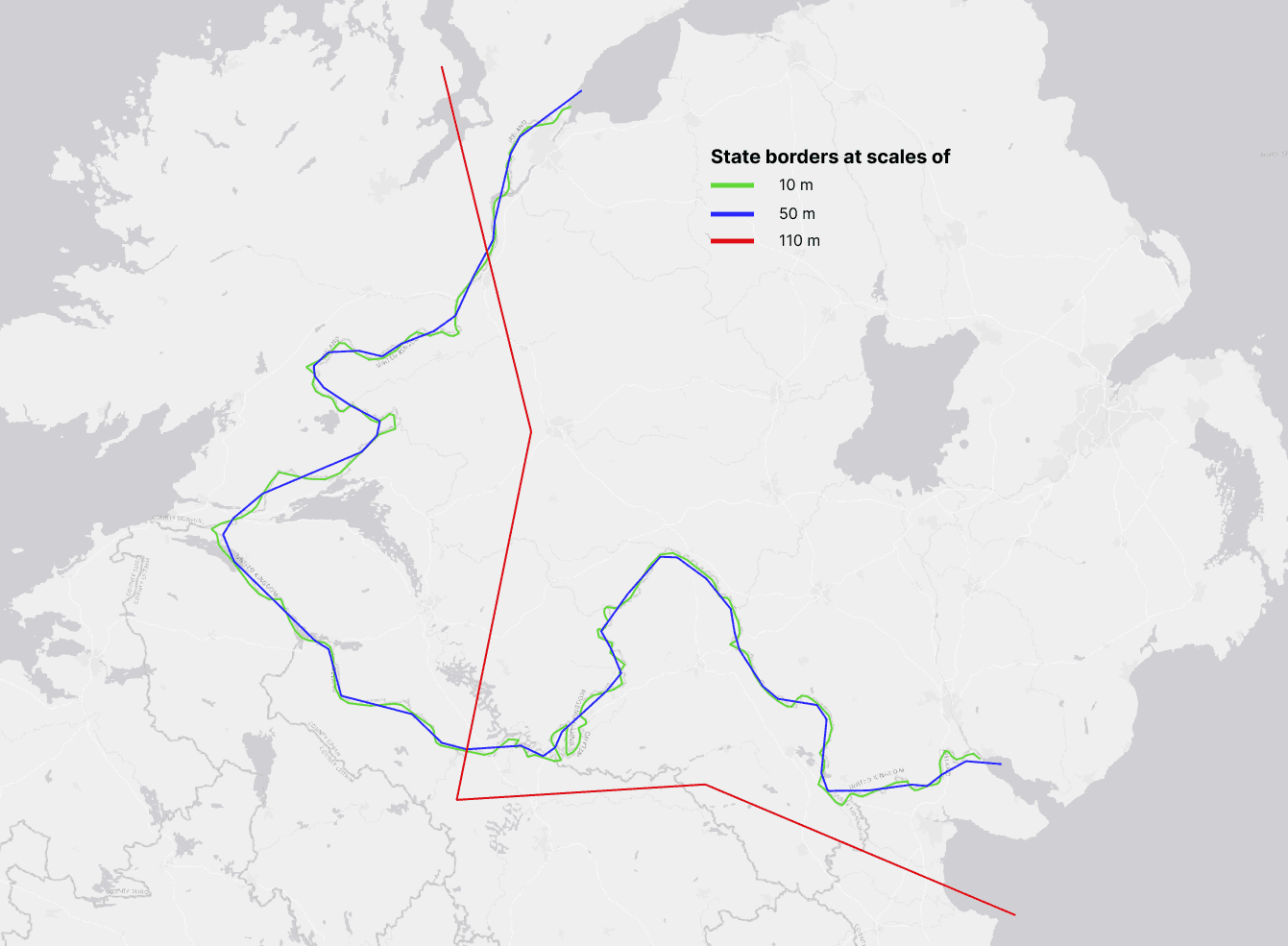
An example of how generalization works: state borders at scales of 10 m, 50 m, and 110 m. Source: Natural Earth
Basic Generalization Methods
There are several basic generalization methods used in both classical cartography and GIS.
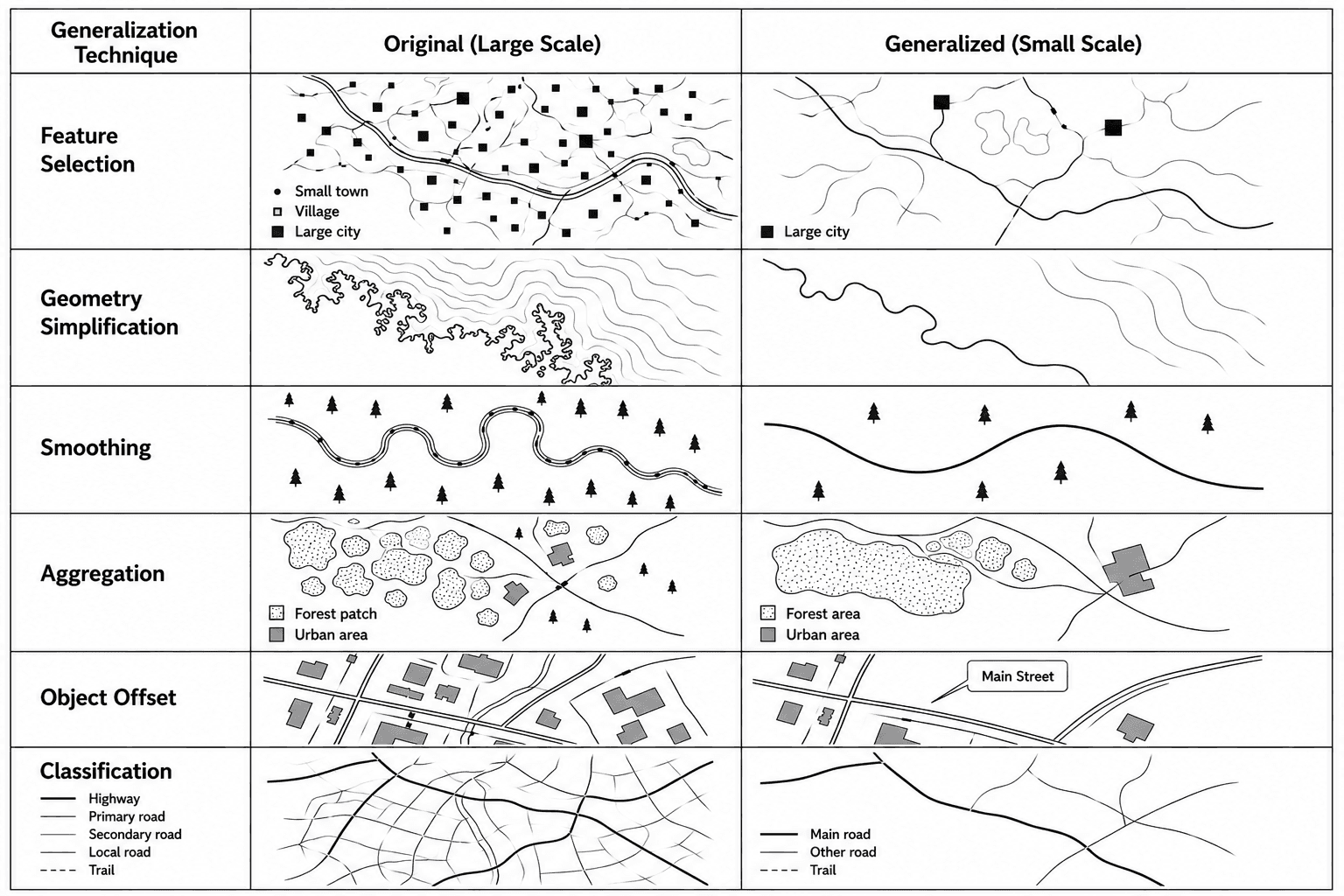
Feature Selection
One of the most important steps is selecting the features to display on the map. Typically, the following factors are considered:
feature size;
its significance;
thematic importance.
For example, on a country map, only large cities are displayed, while smaller towns and villages may be hidden.
Geometry Simplification
This method is used to reduce the number of vertices in lines and polygons. It is especially important for complex features:
coastlines;
rivers;
administrative boundaries.
After simplification, the feature retains its general shape but becomes less detailed.
Smoothing
Smoothing makes lines smoother and more visually accurate. This is often used when creating maps for presentations or web visualizations.
However, excessive smoothing can distort the actual shape of the feature.
Aggregation
Small features can be combined into larger groups. For example:
small forest areas are combined into a single massif;
dense urban development is displayed as a single zone.
Object Offset
Sometimes objects on the map begin to overlap. In this case, an offset is applied. This most often applies to:
labels;
road symbols;
linear features.
Classification
When zooming out, some categories may be combined. For example, many types of roads can be reduced to a few main classes.
Generalization in Modern GIS
Modern GIS systems allow for the automation of many generalization processes. Let's look at some of the available tools.
QGIS
Simplify Geometry;
Smooth Geometry;
Dissolve;
Aggregate.
ArcGIS
ArcGIS has a separate set of Cartographic Generalization tools, including:
Simplify Line;
Simplify Polygon;
Aggregate Polygons.
Automatic generalization is especially important in web GIS. Browser maps must load quickly and display correctly even with large volumes of data. Using too much detailed geometry can dramatically reduce performance, meaning the map will load unevenly and lag.
Therefore, web GIS systems actively use:
vector tiles;
scale-dependent rendering;
dynamic geometry simplification.
For example, as the user zooms in on the map, more and more detail is visible, while as they zoom out, only the main features are displayed.
Generalization Algorithms
Douglas–Peucker
This is one of the most popular line simplification algorithms. It removes points that have the least impact on the shape of an object.
This algorithm is widely used for:
roads;
coastlines;
rivers;
administrative boundaries.
Its main advantage is its high speed.
Visvalingam–Whyatt
This algorithm analyzes the area of triangles between adjacent vertices and removes less significant points.
The result usually appears smoother compared to Douglas–Peucker.
Topological Generalization
When working with transportation networks and administrative boundaries, it is important to maintain the connectivity of features. Topological generalization helps avoid:
line breaks;
overlaps;
geometric errors.
Limitations of Automatic Algorithms
Despite the advancement of GIS, fully automatic generalization is still far from ideal.
Key issues include:
loss of important features;
shape distortion;
oversimplification;
errors in complex coastlines and river networks.
Therefore, many professional maps still require manual correction.
FAQ
Why can't the same data be used at all scales?
Because as the scale decreases, the map becomes cluttered and loses readability.
Does generalization reduce accuracy?
Yes, partially. However, its purpose is to preserve the map's core content and make the data understandable.
Can generalization be fully automated?
Not always. Automatic algorithms help speed up work, but complex maps often require manual adjustments.
Why is generalization especially important for web GIS?
Because the level of detail directly impacts map loading speed and performance.
Key Takeaways
Generalization helps adapt data to scale and task.
In GIS, generalization is used not only for visualization but also to optimize performance.
Automated algorithms significantly simplify the workflow, but they don't always replace manual adjustments.
Good generalization maintains a balance between map detail and readability.